
You might not think much about dust. It gathers on shelves, settles on furniture, and seems like nothing more than a minor household annoyance. But when it comes to your air conditioning system, dust is far more than a cosmetic problem. It’s one of the most common and most destructive forces working against your AC unit every single day.
Here in Richardson, TX and across the Dallas-Fort Worth metroplex, our HVAC systems run hard for much of the year. Texas heat is relentless, and your air conditioner is your first line of defense. When dust infiltrates critical components like the air filter, evaporator coil, and condenser coil, it triggers a chain reaction of problems that can slash efficiency, spike your energy bills, and ultimately lead to a complete system breakdown.
At CityLine Air Conditioning, our licensed technicians see the damage that dust causes on a daily basis. In this guide, we’ll explain exactly what dust does to your AC, how to spot the warning signs early, and what steps you can take to protect your system and keep your home cool and comfortable.
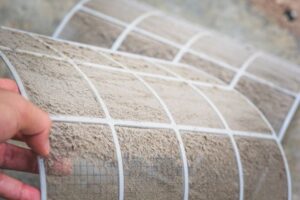
Most people picture dust as simple dirt particles. The reality is much more complex and more concerning for your air conditioner. Household dust is a mix of many different materials, including:
Every time your AC pulls air through the return vents, it draws this cocktail of particles into the system. Without proper filtration and regular maintenance, these particles accumulate on internal components and cause serious performance issues. If your air ducts haven’t been cleaned recently, you could have years of buildup circulating through your home.
Your AC system is designed to circulate air throughout your home, which means it’s constantly pulling in dust-laden air from every room. But several factors can accelerate dust accumulation beyond what your filter can handle:
Dust doesn’t just make your system dirty. It actively degrades performance, increases energy consumption, and shortens the lifespan of expensive components. Here are the three most critical areas where dust does its worst damage:
Your air filter is the primary barrier between airborne dust and your AC’s internal components. When dust accumulates on the filter faster than you replace it, airflow through the system becomes restricted. This sets off a cascade of problems:
The good news? This is the easiest problem to prevent. Simply check your air filter every 30 days and replace it when it looks gray or discolored. For homes with pets or allergy sufferers, monthly replacement is a smart practice.
The evaporator coil is located inside your indoor unit and is responsible for absorbing heat from your home’s air. It operates at very cold temperatures, and under normal conditions, warm airflow prevents the coil from freezing. But when dust coats the coil’s surface, the insulating layer of debris disrupts this balance.
Here’s what happens step by step:
Key Takeaway: If you see ice forming on your refrigerant lines or indoor unit, turn off the AC immediately and call a professional. Running a frozen system can destroy the compressor, which is the most expensive component to replace. Our AC repair team in Richardson can diagnose and fix the issue quickly.
While the evaporator coil absorbs heat indoors, the condenser coil (located in your outdoor unit) releases that heat into the outside air. For this process to work efficiently, the condenser coil needs to be clean and have adequate airflow around it.
Dust, dirt, grass clippings, and debris that accumulate on the condenser coil act like a blanket, trapping heat inside the system. The consequences include:
Your condenser unit sits outside, fully exposed to Texas weather. That means it collects not just household dust, but also pollen, cottonwood fluff, lawn debris, and dirt that gets kicked up by wind and landscaping equipment. Regular AC maintenance includes professional condenser coil cleaning that restores optimal heat transfer.
Dust damage doesn’t always announce itself with a dramatic failure. More often, it’s a gradual decline that you might not notice until it becomes a major problem. Watch for these warning signs:
If you’re experiencing any of these symptoms, it’s time to take action. Many of these issues escalate quickly, and catching them early can save you hundreds or even thousands of dollars in air conditioning repairs.
The best approach to fighting dust is a combination of simple homeowner habits and professional HVAC maintenance. Here’s a practical plan that covers both:
Even with diligent home care, you need a professional annual AC tune-up to address the components you can’t safely reach or properly clean yourself. During a maintenance visit, a CityLine technician will:
Save With a Maintenance Plan:
CityLine’s HVAC Maintenance Program includes scheduled tune-ups so you never miss a service visit. Members also receive priority scheduling and discounts on repairs. It’s the most cost-effective way to keep dust from destroying your investment.Many homeowners don’t realize how directly dust impacts their electric bill. Here’s a quick breakdown of the math:
In a DFW summer where your AC might run 10-14 hours a day, even a 15% efficiency loss adds up fast. On an average monthly cooling bill of $200, that’s an extra $30 per month or $150+ over a typical cooling season. And that doesn’t account for the repair costs when components fail prematurely from the added strain.
Keeping your system clean isn’t just about comfort. It’s about protecting your wallet. If you suspect your AC is losing efficiency, a professional inspection can identify exactly where the problem lies and get your system back on track.
In most cases, regular maintenance and timely repairs are enough to keep dust from causing permanent harm. But if your system has suffered years of neglect, the accumulated damage may make replacement more cost-effective than continued repairs. Consider upgrading your AC if:
Not sure whether to repair or replace? Our team can help you weigh the options. Read our detailed guide on AC repair vs. replacement or request a free estimate for a new energy-efficient system installation.
Dust doesn’t just harm your equipment. It harms your health. When your AC system recirculates dust, allergens, bacteria, and mold spores throughout your home, it contributes to poor indoor air quality that can aggravate:
The EPA estimates that indoor air can be 2-5 times more polluted than outdoor air. Your AC system plays a major role in either improving or degrading that air quality. Combining regular filter changes with professional indoor air quality services and duct cleaning creates a cleaner, healthier living environment for your family.
For most homes in the Dallas-Fort Worth area, you should change or clean your AC air filter every 30 to 90 days. If you have pets, allergies, or live in a particularly dusty area, check the filter monthly and replace it when it looks gray or clogged. A clean filter is the single most effective way to prevent dust from damaging your AC system.
Yes. Accumulated dust clogs your air filter, coats the evaporator coil (causing it to freeze), and insulates the condenser coil so it can’t release heat properly. Over time, this forces your AC to work harder, leading to overheating, compressor failure, and complete system breakdown if left untreated. Timely AC repair prevents these small issues from becoming expensive emergencies.
Common signs include reduced airflow from your vents, rooms that won’t cool evenly, ice forming on the refrigerant lines or evaporator coil, unusually high energy bills, and your AC running constantly without reaching the set temperature. You may also notice musty odors or excessive dust settling on furniture. If you spot any of these, schedule a service call right away.
Absolutely. Professional maintenance typically costs a fraction of an emergency repair or premature system replacement. During a tune-up, technicians clean the evaporator and condenser coils, check refrigerant levels, inspect ductwork for leaks, and ensure your system runs efficiently. The U.S. Department of Energy estimates that regular maintenance can reduce energy consumption by 15-25%. CityLine’s Maintenance Program makes it easy and affordable to stay on schedule.
Whether you need a tune-up, air duct cleaning, or emergency repair, the CityLine Air Conditioning team is ready to help. Our licensed Richardson, TX technicians serve homeowners across the entire DFW metroplex.